


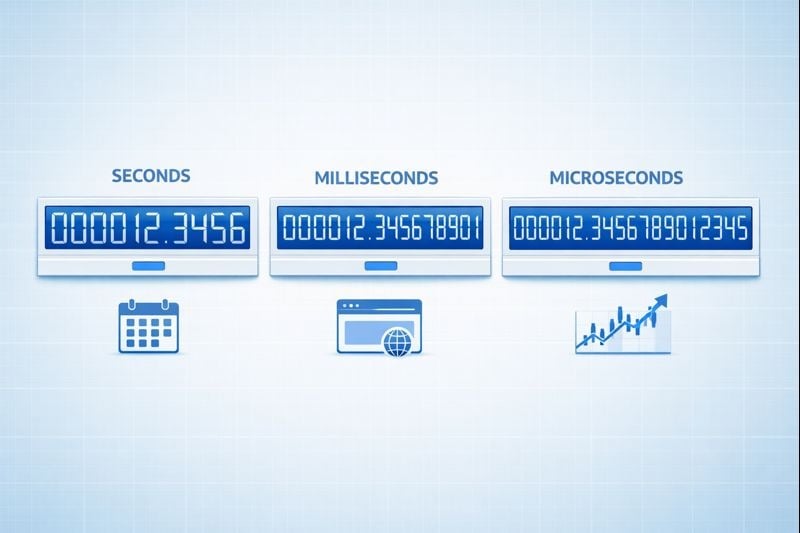
When you're working with Unix timestamps, choosing between seconds vs milliseconds vs microseconds can significantly impact your application's performance, storage requirements, and precision. While Unix timestamps traditionally measure time in seconds since January 1, 1970, modern applications often demand higher precision for logging events, measuring API response times, or synchronizing distributed systems. This guide breaks down the practical differences between each precision level and provides clear criteria to help you make the right choice for your specific use case.
Content Table
Understanding the Three Precision Levels
Unix timestamps represent time as a single number counting from the epoch time reference point. The precision level determines how finely you can measure time intervals.
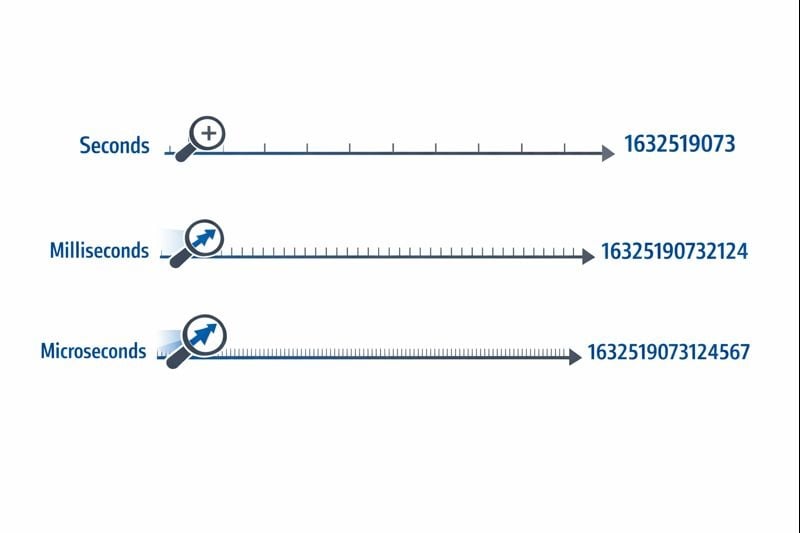
Seconds (10 digits): The original Unix timestamp format uses a 32-bit or 64-bit integer representing whole seconds. A typical value looks like 1704067200, which represents exactly one moment in time without subdivisions.
Milliseconds (13 digits): This format multiplies the seconds value by 1,000, adding three decimal places of precision. The same moment becomes 1704067200000. JavaScript's Date.now() function returns timestamps in this format by default.
Microseconds (16 digits): Used primarily in systems requiring extreme precision, this format multiplies seconds by 1,000,000. The value becomes 1704067200000000. Languages like Python's time.time_ns() can work with even nanosecond precision (19 digits), though microseconds represent the practical upper limit for most applications.
Storage and Performance Implications
The precision level you choose directly affects your database size, memory consumption, and query performance. These constraints become critical as your application scales.
Storage Requirements
A 32-bit integer (4 bytes) can store second-level timestamps until the Year 2038 problem occurs. Most modern systems use 64-bit integers (8 bytes) to avoid this limitation.
- Seconds: 8 bytes for a signed 64-bit integer (BIGINT)
- Milliseconds: 8 bytes for a signed 64-bit integer (BIGINT)
- Microseconds: 8 bytes for a signed 64-bit integer (BIGINT)
While each precision level uses the same 8-byte storage in modern databases, the actual impact comes from indexing and query operations. Larger numbers require more CPU cycles for comparison operations, and index B-trees become slightly less efficient with larger key values.
Database Query Performance
When you're working with Unix timestamps in databases, the precision level affects range queries and sorting operations. A database comparing 10-digit numbers performs marginally faster than comparing 16-digit numbers, though the difference only becomes noticeable at millions of rows.
More critically, mixing precision levels in your database creates conversion overhead. If your application layer sends millisecond timestamps but your database stores seconds, every query requires division by 1,000, preventing efficient index usage.
Network and API Considerations
JSON payloads transmit timestamps as strings or numbers. A 16-digit microsecond timestamp adds 6 extra characters compared to a 10-digit second timestamp. Across millions of API calls, this adds measurable bandwidth costs and serialization overhead.
When to Use Seconds
Second-level precision remains the best choice for most user-facing features where human perception defines the relevant time scale.
Ideal Use Cases
- Social media posts and comments: Users don't perceive differences under one second
- Scheduled tasks and cron jobs: Most automation runs on minute or hour boundaries
- User authentication tokens: Session expiry doesn't require sub-second accuracy
- Content publication dates: Articles, videos, and blog posts use second-level precision
- Booking and reservation systems: Appointments typically align to minute or hour slots
Actionable Implementation Steps
To implement second-level timestamps effectively:
- Use
BIGINTcolumns in your database to store signed 64-bit integers - Create indexes on timestamp columns for range queries like "posts from the last 24 hours"
- In JavaScript, convert millisecond timestamps:
Math.floor(Date.now() / 1000) - In Python, use:
int(time.time()) - Document your precision choice in API specifications so consumers know whether to multiply by 1,000
When to Use Milliseconds
Millisecond precision becomes necessary when you need to track events that occur multiple times per second or measure durations shorter than one second.
Ideal Use Cases
- API response time monitoring: Tracking whether endpoints respond within 200ms or 800ms
- Financial transactions: Recording the exact sequence of trades or payment processing steps
- Real-time messaging: Ordering chat messages sent within the same second
- Video streaming analytics: Recording playback events and buffering incidents
- Distributed system coordination: Synchronizing events across multiple servers
Actionable Implementation Steps
To implement millisecond-level timestamps:
- Use
BIGINTcolumns in your database with clear documentation that values represent milliseconds - In JavaScript, use
Date.now()directly (it returns milliseconds by default) - In Python, use:
int(time.time() * 1000) - For Discord timestamps and similar platforms, milliseconds provide the standard precision
- Add application-level validation to ensure timestamps fall within reasonable ranges (not accidentally in seconds or microseconds)
Real-World Constraints
Millisecond precision introduces a subtle challenge: not all systems generate truly accurate millisecond timestamps. Operating system clock resolution varies, and virtualized environments may only update their clocks every 10-15 milliseconds. Your timestamps might show false precision if the underlying clock doesn't support true millisecond accuracy.
When to Use Microseconds
Microsecond precision is overkill for most applications but becomes essential in specialized domains requiring extreme accuracy.
Ideal Use Cases
- High-frequency trading systems: Recording order book updates that occur thousands of times per second
- Performance profiling and benchmarking: Measuring function execution times in the microsecond range
- Scientific data collection: Logging sensor readings or experimental measurements
- Network packet analysis: Capturing exact timing of network events for security or debugging
- Audio/video processing: Synchronizing multimedia streams at frame or sample level
Actionable Implementation Steps
To implement microsecond-level timestamps:
- Verify your programming language and database support microsecond precision (not all do)
- In Python, use:
int(time.time() * 1_000_000) - In C/C++, use
gettimeofday()orclock_gettime()withCLOCK_REALTIME - Consider using specialized time-series databases like InfluxDB or TimescaleDB designed for high-precision timestamps
- Document the precision requirement clearly, as most developers will assume milliseconds by default
Real-World Constraints
Microsecond timestamps create significant challenges in distributed systems. Network latency typically measures in milliseconds, making microsecond-level synchronization across servers nearly impossible without specialized hardware like GPS-synchronized clocks. If your application runs across multiple data centers, microsecond precision may provide false accuracy.
Case Study: E-commerce Order Processing System
Hypothetical Case Study:
The following example demonstrates real-world decision-making for timestamp precision. While the company is fictional, the technical constraints and solutions represent common scenarios.
ShopFast, a mid-sized e-commerce platform, initially built their order processing system using second-level Unix timestamps. As they scaled to processing 500 orders per minute during peak hours, they encountered a critical problem.
The Problem
Multiple orders placed within the same second couldn't be reliably sorted. When customers contacted support asking "which order went through first?", the system couldn't provide a definitive answer. More critically, their fraud detection system needed to flag when the same credit card was used for multiple purchases within a short window, but second-level precision made this unreliable.
The Analysis
The engineering team evaluated their requirements across different system components:
- Order creation timestamps: Required millisecond precision for proper sequencing
- Product catalog last_updated fields: Second precision remained sufficient
- Payment processing logs: Required millisecond precision for fraud detection
- Customer account creation dates: Second precision remained sufficient
- API request logging: Required millisecond precision for performance monitoring
The Solution
Rather than converting their entire database to milliseconds, they implemented a hybrid approach:
- Migrated
orders.created_atfrom seconds to milliseconds by multiplying existing values by 1,000 - Updated their API layer to accept and return millisecond timestamps for order-related endpoints
- Left user-facing timestamps (account creation, last login) in seconds to minimize migration scope
- Added clear documentation distinguishing which fields used which precision
- Implemented application-level validation to catch accidental precision mismatches
The Results
After migration, the system could reliably sequence orders and detect fraud patterns. The storage increase was negligible (adding three digits to existing numbers), but the improved functionality justified the migration effort. Query performance remained virtually identical since they maintained proper indexing.
The key lesson: you don't need uniform precision across your entire application. Choose the appropriate level for each specific use case based on actual requirements, not theoretical concerns.
Best Practices for Choosing Timestamp Precision
Follow these guidelines when implementing Unix timestamps in your applications:
1. Start with Seconds, Upgrade Only When Necessary
Default to second-level precision unless you have a specific requirement for finer granularity. Premature optimization wastes development time and creates unnecessary complexity. Most applications never need sub-second precision.
2. Maintain Consistency Within Domains
Use the same precision level for related timestamps. If your orders table uses milliseconds, your order_items and order_payments tables should match. Mixing precision levels forces constant conversion and creates bugs.
3. Document Your Precision Choice
Add comments in your database schema, API documentation, and code explaining whether timestamps represent seconds, milliseconds, or microseconds. A timestamp value of 1704067200000 is ambiguous without context.
4. Validate Timestamp Ranges
Implement validation to catch precision errors. A timestamp in seconds should fall between roughly 1,000,000,000 (September 2001) and 2,000,000,000 (May 2033) for current dates. A millisecond timestamp should be approximately 1,000 times larger. Catching these errors early prevents data corruption.
5. Consider Your Database's Native Types
Some databases offer native timestamp types with built-in precision. PostgreSQL's TIMESTAMP type stores microsecond precision internally. MySQL's DATETIME type supports microseconds since version 5.6.4. These native types often provide better query optimization than storing raw integers.
6. Account for Clock Drift in Distributed Systems
If you're comparing timestamps generated by different servers, even millisecond precision can be misleading without proper clock synchronization. Implement NTP (Network Time Protocol) on all servers and consider using logical clocks (like Lamport timestamps or vector clocks) for ordering events in distributed systems.
7. Test Conversion Logic Thoroughly
When converting between precision levels, test edge cases like negative timestamps (dates before 1970), very large timestamps (far future dates), and the boundaries of your integer types. A 32-bit integer can't store millisecond timestamps beyond 2038.
8. Plan for the Year 2038 Problem
If you're using second-level timestamps, ensure you're using 64-bit integers, not 32-bit. The Year 2038 problem only affects 32-bit signed integers. Following our Complete Developer Guide helps future-proof your application.
Conclusion
Choosing between seconds vs milliseconds vs microseconds for Unix timestamps depends on your specific application requirements, not arbitrary technical preferences. Second-level precision handles most user-facing features efficiently, millisecond precision enables API monitoring and real-time coordination, and microsecond precision serves specialized high-frequency applications. Start with the simplest option that meets your needs, maintain consistency within related data, and document your choices clearly. By understanding the practical trade-offs between storage, performance, and precision, you can make informed decisions that scale with your application's growth.
Convert Between Timestamp Formats Instantly
Switch between seconds, milliseconds, and microseconds with our free Unix timestamp converter. No coding required.
Try Our Free Tool →